Unit 2 · Boolean Expressions
Boolean Expressions
Learn how Python represents true and false states, evaluates logical conditions, and uses comparison and logical operators to guide code decision-making.
Introduction
In computer programming, a program often needs to make decisions before performing an action. For example:
- Is the user logged in?
- Is the entered password correct?
- Has the student scored more than 40 marks?
- Is the shopping cart empty?
- Is the weather suitable for playing cricket?
To answer these kinds of questions, Python uses Boolean Expressions.
A Boolean expression is an expression whose result is always either
True or False.
These two values belong to Python's built-in
bool data type.
Boolean expressions are one of the most important concepts in programming because
they help computers make decisions. Every conditional statement such as
if, if-else, loops, and many advanced programming
concepts depend on Boolean expressions.
Whenever Python compares two values, checks a condition, or combines multiple conditions using logical operators, it produces a Boolean value.
Easy Definition
A Boolean Expression is any expression whose answer is only one of two values: True or False.
Real-Life Example
- Is the classroom door open?
- Is your age greater than 18?
- Is today Sunday?
- Is your mobile battery above 20%?
Every question has only two answers: Yes (True) or No (False).
Examination Point of View
- Definition of Boolean Expression is frequently asked.
- Difference between Boolean values and Boolean expressions.
- Applications of Boolean expressions.
- Questions based on True and False evaluation.
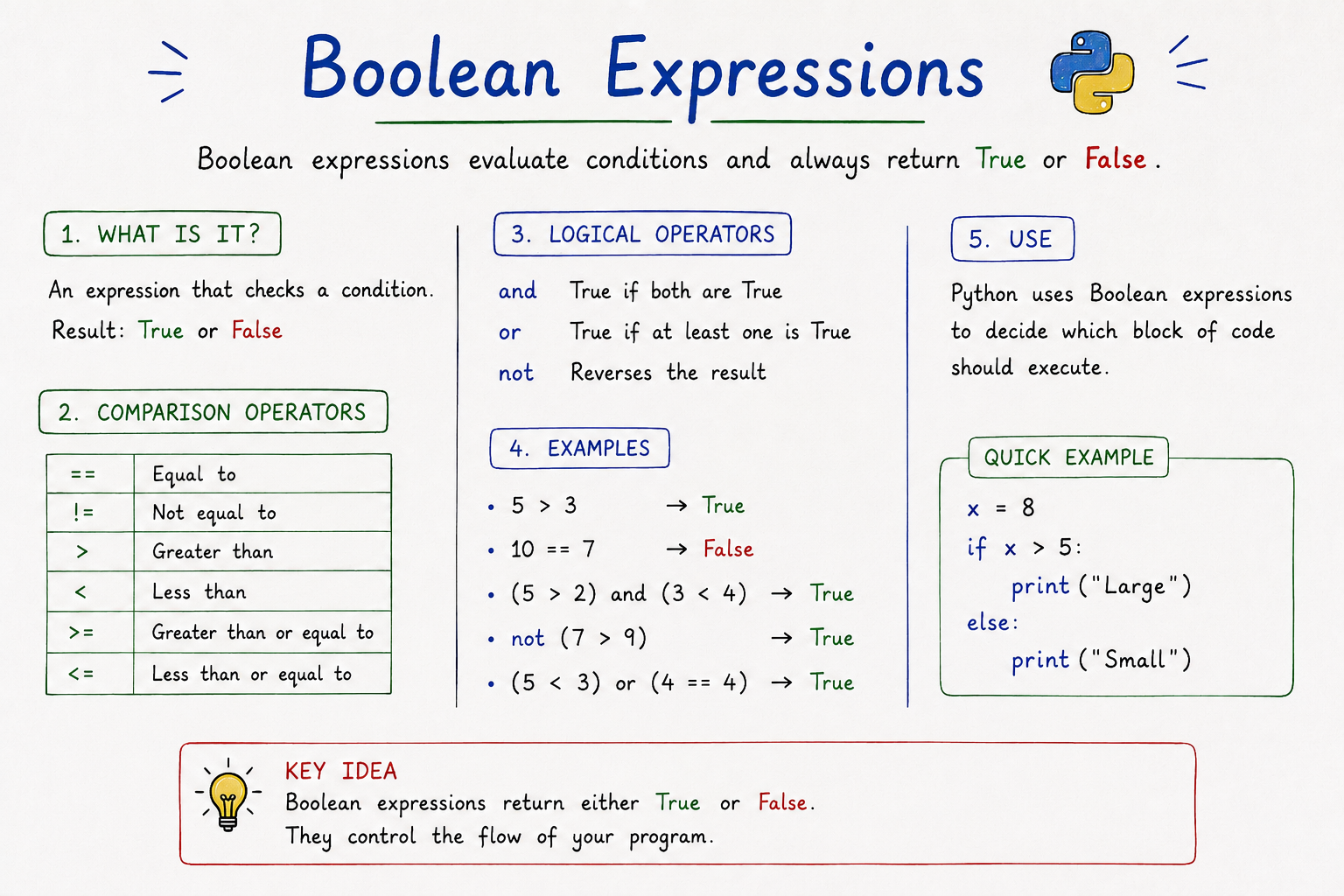
Table of Contents
The bool Data Type
The word bool comes from the name of the famous English mathematician George Boole, who introduced Boolean Algebra. Modern programming languages use his concepts to represent logical values.
Python provides a built-in data type called bool.
It contains only two possible values:
TrueFalse
These values are used whenever Python needs to determine whether a condition is satisfied or not.
Important Rules
- True and False always begin with a capital letter.
- true and false are invalid in Python.
- bool is a built-in data type.
- A Boolean variable stores only True or False.
is_active = True
is_finished = False

print(is_active)
print(is_finished)

print(type(is_active))
Output
True
False
<class 'bool'>
Explanation
is_activestores the value True.is_finishedstores the value False.type()returns the data type of the variable.- The output confirms that Python stores Boolean values using the
booldata type.
Real-Life Examples
| Situation | Boolean Value |
|---|---|
| Student passed the exam | True |
| Internet connection available | True |
| Password is incorrect | False |
| ATM has sufficient balance | True / False |
Competitive Exam Notes
- Boolean data type contains only two values.
- Python keywords are True and False.
- bool is derived from Boolean Algebra.
- True is internally represented as 1.
- False is internally represented as 0.
- Boolean values are heavily used in conditions and loops.
Comparison Operators
Comparison operators are special operators used to compare two values,
variables, or expressions. After comparison, Python always returns a
Boolean value (True or False).
They are mainly used in decision-making statements such as
if, if-else, while,
for, and many real-world applications where a condition
must be checked before executing a block of code.
Easy Definition
A comparison operator compares two values and returns either True or False.
| Operator | Meaning | Example | Output |
|---|---|---|---|
== |
Equal to | 10 == 10 |
True |
!= |
Not Equal to | 10 != 5 |
True |
> |
Greater Than | 20 > 15 |
True |
< |
Less Than | 10 < 7 |
False |
>= |
Greater Than or Equal To | 15 >= 15 |
True |
<= |
Less Than or Equal To | 12 <= 20 |
True |
Understanding Each Comparison Operator
1. Equal To (==)
The equal operator checks whether two values are exactly the same.
If both values are equal, Python returns True;
otherwise, it returns False.
x = 10
y = 10

print(x == y)
Output:
True
2. Not Equal To (!=)
This operator checks whether two values are different.
If they are different, the result becomes True.
x = 25
y = 10

print(x != y)
True
3. Greater Than (>)
Returns True only when the value on the left side is
greater than the value on the right side.
marks = 85

print(marks > 40)
True
4. Less Than (<)
Returns True when the left value is smaller than
the right value.
age = 15

print(age < 18)
True
5. Greater Than or Equal To (>=)
Returns True if the first value is either greater than
or exactly equal to the second value.
salary = 50000

print(salary >= 50000)
True
6. Less Than or Equal To (<=)
Returns True if the first value is smaller than or
exactly equal to the second value.
temperature = 30

print(temperature <= 35)
True
Real-Life Examples
| Situation | Condition | Result |
|---|---|---|
| Voting Eligibility | age >= 18 |
True / False |
| Pass or Fail | marks >= 40 |
True / False |
| ATM PIN Check | entered_pin == saved_pin |
True / False |
| Discount Eligibility | purchase >= 5000 |
True / False |
Common Mistakes
- Using
=instead of==. - Confusing
>with>=. - Writing
=>instead of>=. - Writing
=<instead of<=. - Assuming comparison operators return numbers instead of Boolean values.
Examination Notes
- Comparison operators always return True or False.
=means assignment.==means comparison.- Comparison operators are widely used with
if,elif,while, and loops. - Every programming language provides comparison operators.
Interview & Competitive Exam Questions
- What is the difference between
=and==? - Which comparison operator checks inequality?
- What is the output of
5 >= 5? - Can comparison operators return anything other than True or False?
- Where are comparison operators commonly used?
Logical Operators
In many real-world situations, checking a single condition is not enough. Sometimes we need to check two or more conditions together before making a decision. Python provides Logical Operators to combine multiple Boolean expressions into a single expression.
Logical operators work only with Boolean values
(True and False). The result of every logical
operation is also a Boolean value.
Easy Definition
Logical operators combine two or more conditions and return either True or False.
Types of Logical Operators
| Operator | Meaning | Returns True When |
|---|---|---|
and |
Logical AND | Both conditions are True. |
or |
Logical OR | At least one condition is True. |
not |
Logical NOT | Reverses the Boolean value. |
1. AND Operator
The and operator checks whether all conditions are true.
If every condition is True, Python returns True.
If even one condition is False, the entire expression becomes False.
Easy Rule
All conditions must be True.
age = 22
citizen = True

print(age >= 18 and citizen)
Output
True
Since both conditions are True, Python returns True.
Another Example
marks = 35
attendance = 90

print(marks >= 40 and attendance >= 75)
False
Although attendance is sufficient, marks are below 40. Therefore the overall result becomes False.
2. OR Operator
The or operator returns True when at least one condition
is True. It returns False only when every condition is False.
Easy Rule
Only one condition needs to be True.
username = "admin"
password = "1234"

print(username == "admin" or password == "admin123")
True
The username is correct, so Python returns True without requiring the second condition to be True.
Another Example
temperature = 42

print(temperature < 0 or temperature > 40)
True
Since the second condition is True, the overall result becomes True.
3. NOT Operator
The not operator reverses the Boolean value.
It converts True into False and False into True.
Easy Rule
True becomes False, and False becomes True.
logged_in = True

print(not logged_in)
False
Another Example
is_raining = False

print(not is_raining)
True
Combining Multiple Logical Operators
Logical operators can also be combined in a single expression.
marks = 85
attendance = 80
sports = True

print((marks >= 40 and attendance >= 75) or sports)
True
Here, Python first evaluates the expression inside parentheses and then applies the OR operator.
Operator Precedence
If multiple logical operators are present in the same expression, Python follows a specific order of evaluation.
| Priority | Operator |
|---|---|
| 1 | not |
| 2 | and |
| 3 | or |
Memory Trick
N → A → O
NOT → AND → OR
Real-Life Examples
| Situation | Expression |
|---|---|
| College Admission | marks >= 60 and interview == True |
| Voting | age >= 18 and citizen == True |
| Login System | username == "admin" and password == "123" |
| Weekend Holiday | day == "Saturday" or day == "Sunday" |
| Invert Result | not logged_in |
Common Mistakes
- Using
&&instead ofand. - Using
||instead ofor. - Writing
!instead ofnot. - Forgetting operator precedence.
- Confusing comparison operators with logical operators.
Examination Notes
- Logical operators combine Boolean expressions.
andrequires every condition to be True.orrequires at least one condition to be True.notreverses the Boolean value.- Logical operators always return True or False.
- They are extensively used in decision-making and loops.
Practice MCQs
1. Which logical operator requires every condition to be True?
A) or B) not C) and D) xor
Answer: C) and
2. What is the output?
True or False
Answer: True
3. What is the output?
not True
Answer: False
Truth Tables
A Truth Table is a table that shows all possible
combinations of Boolean values (True and
False) and the result of applying logical operators
such as and, or, and not.
Truth tables help us understand how logical expressions work. They are one of the most important topics in Boolean Algebra, Digital Electronics, Computer Programming, Artificial Intelligence, and Database Management Systems.
Easy Definition
A Truth Table is a chart that shows every possible input and the corresponding output of a logical expression.
Why Do We Need Truth Tables?
- To understand logical operators clearly.
- To predict program output before execution.
- To design digital circuits.
- To simplify Boolean expressions.
- To solve competitive programming questions.
- To understand decision-making in programming.
Truth Table for and and or
| A | B | A and B | A or B |
|---|---|---|---|
True |
True |
True
|
True
|
True |
False |
False
|
True
|
False |
True |
False
|
True
|
False |
False |
False
|
False
|
Truth Table for not
| A | not A |
|---|---|
| True | False |
| False | True |
Understanding the Truth Table
Case 1 : True AND True
Both conditions are True, so the AND operator returns True.
Case 2 : True AND False
One condition is False, therefore the result becomes False.
Case 3 : False AND True
Since one condition is False, the result is False.
Case 4 : False AND False
Both conditions are False, therefore the result is False.
Memory Trick
- AND = All must be True.
- OR = One True is enough.
- NOT = Reverse the answer.
Real-Life Examples
| Situation | Operator Used |
|---|---|
| Eligible for exam only if attendance and fees are complete. | AND |
| Login using Email or Mobile Number. | OR |
| Show Login button when user is NOT logged in. | NOT |
Important Examination Points
- Truth tables always use only True and False values.
- AND becomes True only when every input is True.
- OR becomes False only when every input is False.
- NOT reverses the Boolean value.
- Truth tables are frequently asked in university examinations.
- Truth tables are also important in Digital Logic and Boolean Algebra.
Common Mistakes
- Confusing AND with OR.
- Thinking NOT changes variables instead of Boolean values.
- Memorizing truth tables without understanding them.
- Ignoring operator precedence.
Practice Questions
- Prepare the truth table of the AND operator.
- Write the truth table for the OR operator.
- Explain the NOT operator with an example.
- Differentiate between AND and OR using a truth table.
- Why are truth tables important in programming?
Short-Circuit Evaluation
Python evaluates logical expressions intelligently using a technique called Short-Circuit Evaluation. Instead of evaluating every condition one by one, Python stops evaluating as soon as it can determine the final result of the entire expression.
This optimization makes Python programs faster, more efficient, and helps prevent unnecessary calculations and runtime errors.
Easy Definition
Short-Circuit Evaluation means Python stops checking remaining conditions once the final answer is already known.
Why Does Python Use Short-Circuit Evaluation?
- Improves program performance.
- Reduces unnecessary calculations.
- Prevents runtime errors.
- Makes logical expressions more efficient.
- Saves CPU execution time.
Short-Circuit with AND Operator
The and operator returns True only if every condition is
True. Therefore, if the first condition becomes False,
Python immediately knows the final answer will also be False.
It does not evaluate the remaining conditions.
x = 5

print(x > 10 and x < 20)
Output
False
Step-by-Step Evaluation
- Python checks
x > 10. - The answer is False.
- Since AND requires every condition to be True, Python already knows the final answer.
- The second condition is skipped.
- Final result is False.
Easy Memory Rule
False First → Stop Immediately (AND)
Short-Circuit with OR Operator
The or operator returns True if at least one condition is True.
If the first condition is already True,
Python immediately stops checking the remaining conditions because
the final answer cannot change.
x = 15

print(x > 10 or x < 5)
Output
True
Step-by-Step Evaluation
- Python checks
x > 10. - The answer is True.
- OR requires only one True value.
- The second condition is skipped.
- Final result is True.
Easy Memory Rule
True First → Stop Immediately (OR)
Preventing Runtime Errors
One of the biggest advantages of Short-Circuit Evaluation is that it prevents many runtime errors.
Consider the following example.
x = 0
y = 10

print(x != 0 and (y / x) > 2)
Explanation
- Python first checks
x != 0. - The result is False.
- Since AND cannot become True anymore, Python skips
y/x. - Therefore, no
ZeroDivisionErroroccurs.
Execution Flow
| Operator | First Condition | Second Condition Checked? |
|---|---|---|
| AND | False | No |
| AND | True | Yes |
| OR | True | No |
| OR | False | Yes |
Real-Life Examples
| Situation | Why Short-Circuit Helps |
|---|---|
| ATM PIN Verification | If PIN is incorrect, account balance is never checked. |
| Website Login | If username is wrong, password verification is skipped. |
| Online Shopping | If product is unavailable, payment process is skipped. |
| College Admission | If marks are below eligibility, interview is not evaluated. |
Performance Benefits
- Faster program execution.
- Less CPU usage.
- Reduces unnecessary function calls.
- Improves code efficiency.
- Avoids expensive calculations.
Common Mistakes
- Assuming Python always evaluates every condition.
- Ignoring Short-Circuit behavior while debugging.
- Writing unsafe expressions like
10/xwithout checking ifxis zero. - Using expensive function calls before simple conditions.
Important Examination Points
- Short-Circuit Evaluation is an optimization technique.
- AND stops after the first False.
- OR stops after the first True.
- It improves performance.
- It prevents runtime errors like ZeroDivisionError.
- Frequently asked in Python interviews and university exams.
Interview Questions
- What is Short-Circuit Evaluation?
- How does AND perform Short-Circuit Evaluation?
- How does OR perform Short-Circuit Evaluation?
- Why is Short-Circuit Evaluation important?
- How does it improve program performance?
- How does it prevent ZeroDivisionError?
Practice Questions
1. What is the output?
False and True
Answer: False
2. What is the output?
True or False
Answer: True
3. Which operator stops after the first False?
Answer: AND
4. Which operator stops after the first True?
Answer: OR
Summary
Boolean expressions evaluate to True or False. They form the logical core of
all
control flow systems in Python. Comparison operators check relations, while logical operators combine
multiple checks using short-circuit efficiency rules.